MU Services DDoSGuard
Real-time firewall protection for exposed Windows server ports. Built for game servers, web servers, launchers, login servers, and custom TCP or UDP services.
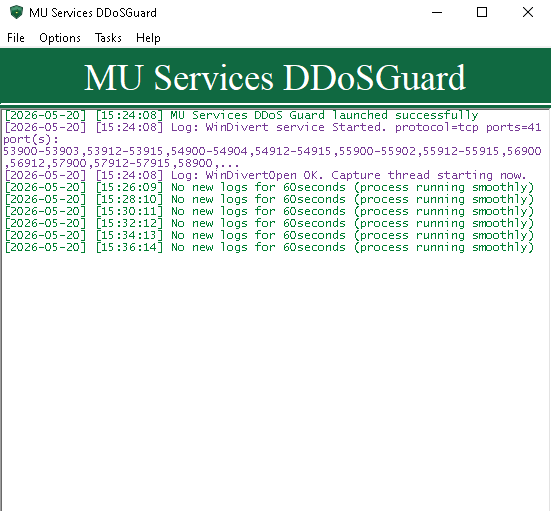
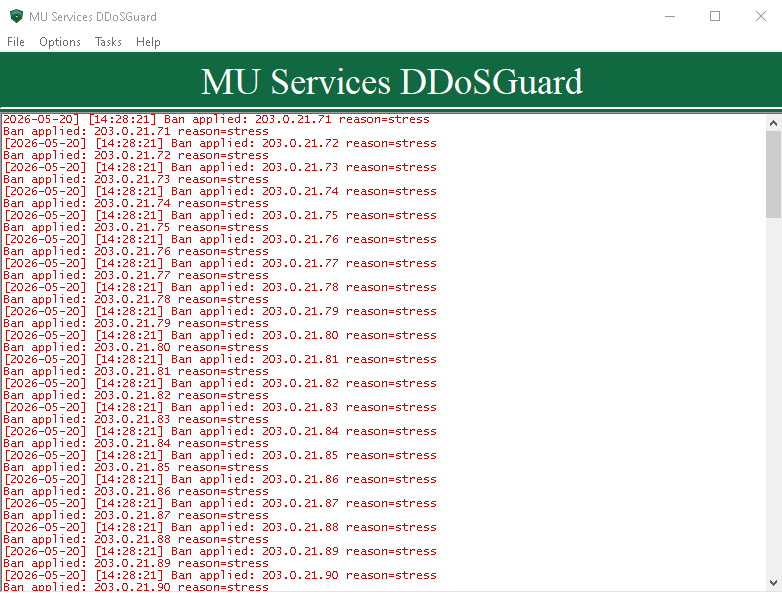
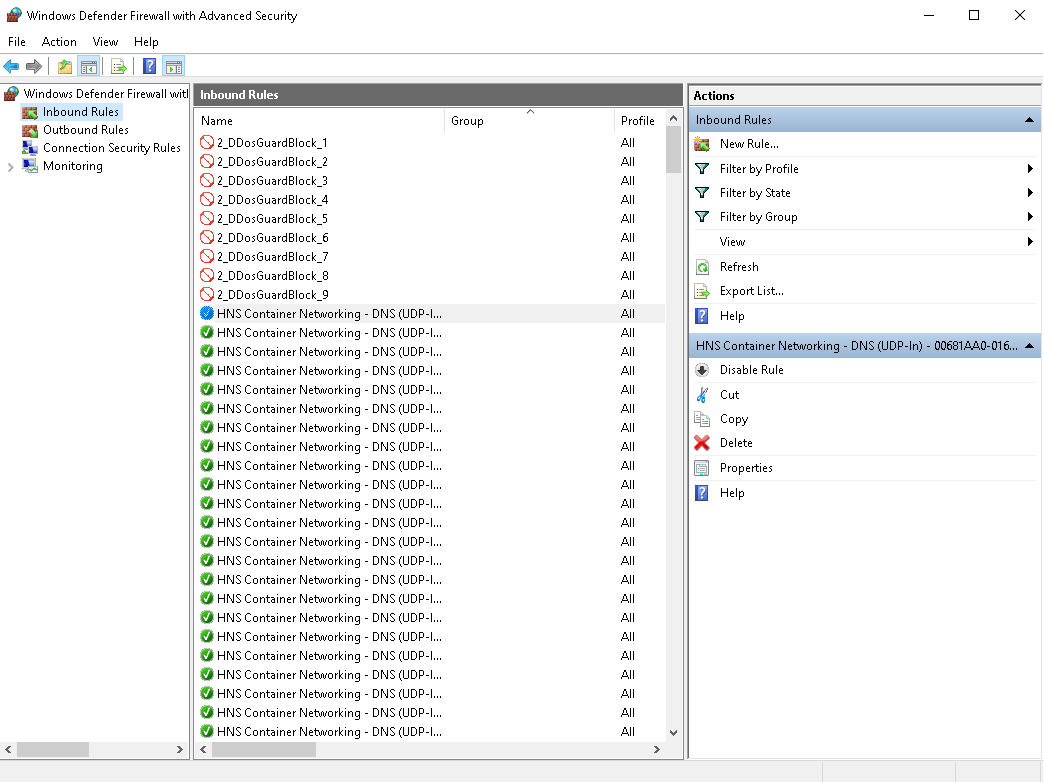
Real-Time Firewall Protection for Exposed Windows Server Ports
MU Services DDoSGuard is a Windows security tool built to protect game servers, web servers, and custom services from abusive IPs attacking open ports.
It monitors your selected ports in real time, detects suspicious connection behavior, and automatically blocks abusive IPs through Windows Firewall before they can overload your service.
If your server has a public port open, that port can be attacked. DDoSGuard is built to protect exactly that weak point.
Do not invest serious time and money into a Windows server project without planning for flood protection. Since the COVID era, attack activity and extortion attempts against exposed servers have increased, and some attackers may threaten server owners with downtime unless they pay.
Works With Any Game Server or Windows Service
Although DDoSGuard was built with game servers in mind, it is not locked to one game. It can protect any configured Windows server port.
You can configure it to monitor TCP-only, UDP-only, or TCP + UDP server ports depending on what your game server, launcher, login service, web service, or custom application needs.
- MU Online servers
- Minecraft servers
- WOW servers
- GTA 5 servers
- MMORPG private servers
- FPS game servers
- Login servers
- TCP and UDP game ports
- Windows web servers
- Launcher/update servers
- Custom TCP or UDP services
- Any public Windows service with exposed ports
Why Open Ports Need DDoSGuard
Most dedicated servers already include some type of DDoS protection, especially providers like OVH. But your game server port still has to stay open.
Attackers may not need to take down the entire network. They can target only the open game port, login port, web port, or service port until the application becomes slow, unstable, or unreachable.
Most game server and application developers do not build this full protection layer into their software. Many projects only include basic anti-flood checks, without automatic Windows Firewall ban rules, safe ban queues, persistent blocked-IP memory, or controlled rule management.
DDoSGuard works directly on the Windows server, watching exposed TCP ports, UDP ports, or both together, then blocking abusive IPs automatically before port pressure becomes service instability.
- Detects when one IP opens too many active connections
- Detects fast reconnect spam from the same IP
- Tracks per-IP traffic pressure with WinDivert packet monitoring
- Blocks abusive IPs through Windows Firewall automatically
- Protects game, login, launcher, web, and custom service ports
- Reduces load before abusive traffic reaches your application
- Keeps ban handling controlled instead of leaving it to the game server
Automatic Windows Firewall Blocking
When DDoSGuard detects an abusive IP, it automatically adds that IP to Windows Firewall block rules. Bad traffic is blocked at the operating system firewall level instead of relying on your game server, web server, or application to deal with it.
- Automatic IP blocking
- Windows Firewall rule creation
- Inbound block rules
- Configurable firewall rule prefix
- Automatic firewall rule updates
- Duplicate-ban prevention
- Manual Unban All option
- Manual Clear Rules option
- Optional automatic unban after a configured time
- Safe firewall write handling through the Windows Firewall API
Safe Firewall Rule Management
Many automatic firewall tools fail because they create too many rules, duplicate entries, or overload the system. DDoSGuard uses controlled limits to protect the server from firewall overflow and memory pressure.
Bans can stay permanent or be removed automatically after a configured number of minutes. When auto-unban is enabled, expired IPs are removed safely from firewall rules only after the firewall update succeeds.
- Configurable maximum IPs per firewall rule
- Automatic rule splitting when a rule becomes full
- Bounded ban queue
- Configurable ban queue capacity
- Maximum tracked IP limit
- Configurable delay between firewall edits
- Existing banned-IP memory tracking
- Duplicate IP prevention
- Safe placeholder rule handling
- Firewall update verification
- Optional automatic unban after a configured time
- Optional global reset timer
- Clean temporary-ban handling
Persistent Protection After Restart
DDoSGuard does not forget its protection state after restart. When the app starts, it scans existing DDoSGuard firewall rules and reloads already-banned IPs into memory.
- Reloads existing firewall rules on startup
- Rehydrates already-banned IPs into memory
- Prevents duplicate bans after restart
- Saves pending ban queue to disk
- Recovers pending bans after restart
- Uses atomic queue persistence writes
- Keeps firewall state clean and consistent
Crash-Resilient and Overflow-Protected Design
DDoSGuard was built with stability in mind. The protection system includes safeguards to avoid crashes, overflow problems, memory pressure, UI freezes, and unsafe shutdown behavior.
- Watchdog thread
- Unhandled exception handler
- Automatic crash minidump creation
- Out-of-memory handler
- Protected worker threads
- Safe thread shutdown
- Clean WinDivert shutdown
- Bounded UI log queue
- Configurable UI log line limit
- Rolling log file size limit
- Maximum unique IPs per scan
- Maximum tracked IPs
- Config value clamping to prevent unsafe settings
- Controlled firewall edit intervals
- Queue persistence for crash recovery
Safe Whitelist Support
DDoSGuard includes safe CIDR whitelist support so trusted IPs or ranges can be excluded from automatic bans.
- Admin IPs
- Staff IPs
- Monitoring services
- Backup servers
- Datacenter/internal IPs
- Trusted remote tools
Logging and Diagnostics
DDoSGuard includes detailed logging for protection events and troubleshooting. Dry-run mode helps test thresholds before allowing real firewall bans.
Blocked IPs during attacks are logged with a reason, so you can permanently ban them later if needed using your own PowerShell workflow.
- Timestamped logs
- File logging
- Console logging option
- GUI logging option
- Rolling log file size limit
- Debug heartbeat option
- Per-IP debug output option
- Ban reason tracking
- Firewall update logs
- Error logs
- Dry-run test ban mode
The Perfect Companion for Protected Dedicated Servers
Your dedicated server protection is important, but your public game port is still exposed. That open port is exactly what attackers target.
MU Services DDoSGuard adds an extra protection layer directly on your Windows server, automatically detecting abusive IPs and blocking them through Windows Firewall.
Let your host absorb the big attack. Let DDoSGuard protect the open ports your server depends on.